A Simple Guide to Offline Conversion Tracking
Picture this: someone clicks your Google Ad, fills out a form on your website, and then, two weeks down the line, seals the deal with your sales team over the phone. Without a way to connect those dots, Google's ad platform has no idea it just landed you a paying customer. Offline conversion tracking is the bridge that connects sales happening in your CRM back to the very ad click that started it all.
Why Offline Conversions Matter More Than Ever

Ad platforms like Google and Meta are brilliant at tracking what happens online—think form submissions or e-commerce purchases. But for a ton of businesses, especially in B2B or industries with long sales cycles, that initial form fill is just the first step.
The real conversion, like a signed contract or a paid invoice, often happens days, weeks, or even months later, completely disconnected from your website.
This creates a massive blind spot in your marketing data. Your ad platforms might show a ton of "leads," but they're clueless about which ones actually turned into revenue. This gap causes some pretty serious problems:
- You can't trust your ROAS. How can you calculate a true Return on Ad Spend if you're only measuring the cost per lead instead of the cost per actual paying customer? You can't.
- You're wasting ad spend. Ad algorithms are smart, but they only optimize for the goals you give them. If you only tell them to find people who fill out forms, that's what they'll do—even if those people never buy.
- Your strategy is based on incomplete data. You might end up pausing a fantastic campaign that brings in high-value customers just because its cost-per-lead metric looks a little high on the surface.
The Real Impact on Your Bottom Line
When you get offline conversion tracking right, you're finally equipped to make genuinely smart marketing decisions. This isn't just some technical box-ticking exercise; it’s a real strategic advantage.
Just look at Freedom Mobiles. They saw a 20% increase in conversion rates after they started tracking offline sales in Google Ads. That’s a huge amount of revenue that was previously just floating in the ether, completely unattributed. Without this connection, you’re left guessing whether your wins in HubSpot or Pipedrive have anything to do with your ad campaigns.
By feeding your CRM sales data back to your ad platforms, you're giving the algorithms the exact fuel they need to find more of your best customers, not just more leads. This is the heart of what we call modern marketing attribution.
Understanding the Full Customer Journey
Ultimately, this whole process is about seeing the full story. It connects that first anonymous click to the final sale, giving you undeniable proof of which keywords, ads, and campaigns are actually moving the needle.
To go even deeper, you can explore multi-touch attribution models to see how different touchpoints contribute to those final offline sales. In this guide, we'll show you exactly how to build that bridge and close the data gap for good.
Capturing the Data That Makes Tracking Possible
For offline conversion tracking to even be a possibility, you have to get good at collecting data. The whole system relies on grabbing the right information at the exact moment a lead fills out a form on your website. If you miss that initial data point, you’ll never be able to connect a sale in your CRM back to the ad click that brought them to you.
This is where the ad platforms lend a hand. When someone clicks your Google Ad, a unique ID called a Google Click ID (GCLID) gets tacked onto the end of your landing page URL. Think of it as a unique tracking number for that specific click. It's the digital breadcrumb that connects a person to an ad.
Meta (Facebook) has its own version, the Facebook Click ID (FBCLID), and you'll find similar identifiers on other ad networks. This little string of characters is the key that unlocks everything.
The Hidden Field Solution
So, here's the problem most people run into. That click ID is sitting right there in the browser's URL bar, but your contact form has no idea it exists. Your form is busy asking for a name and an email, and it isn't designed to peek at the URL and grab that GCLID.
This is where the trail goes cold for so many businesses. If you don't capture that ID when the lead submits the form, you've lost the connection forever.
The fix is actually pretty simple: hidden fields. These are just form fields that your visitors can't see. You can set them up to automatically capture information from the URL, like that all-important click ID. By adding a hidden field for the GCLID, you ensure this vital tracking code gets saved right alongside the lead's contact details in your CRM. You can dive deeper into this setup by reading our guide on using hidden fields in your forms.
Capturing More Than Just a Click ID
While the GCLID is absolutely essential for connecting sales back to your ads, it's just one piece of the puzzle. A truly powerful setup captures a whole lot more.
Capturing the click ID tells the ad platforms what's working. Capturing the rest of the attribution data tells you the full story behind every lead.
Why just stop there? With a proper setup, you can use hidden fields to grab a complete marketing profile on every lead, giving your sales team valuable context and your marketing reports much deeper insights.
Here’s what you should be capturing from every single form submission:
- Marketing Channel: Did they come from Paid Search, Organic Search, or Social Media? This helps you see what's driving leads across the board, not just from your paid ads.
- Source / Medium: Get granular with data like
google / cpcorfacebook / cpc. - Campaign Name: Pinpoint the exact campaign that generated the lead.
- Original Landing Page: Which page did they first land on? This is huge for figuring out which of your pages are actually converting visitors.
When you capture this complete dataset, you’re doing more than just enabling offline conversion tracking. You’re building a rich, intelligent CRM that shows you exactly how customers find you. Getting this foundational step right makes everything else possible.
So, you’ve successfully captured all that juicy attribution data and it’s sitting nicely in your CRM. Now what? The next step is where the magic really happens: closing the loop.
This is all about connecting the final sale back to the ad platform that started the whole conversation. You're basically taking your sales data from systems like HubSpot or Salesforce and feeding it right back into Google Ads or Meta Ads Manager.
Think of it as giving your ad campaigns a performance review. You’re telling them, "Hey, that person who clicked the ad last Tuesday? They just became a customer worth $5,000." This is the feedback that turns your campaigns from simple lead-generation machines into powerful revenue drivers.
The whole process starts online and ends offline. A prospect clicks an ad, fills out a form, and that information lands in your CRM. This diagram lays out that first, crucial part of the journey.
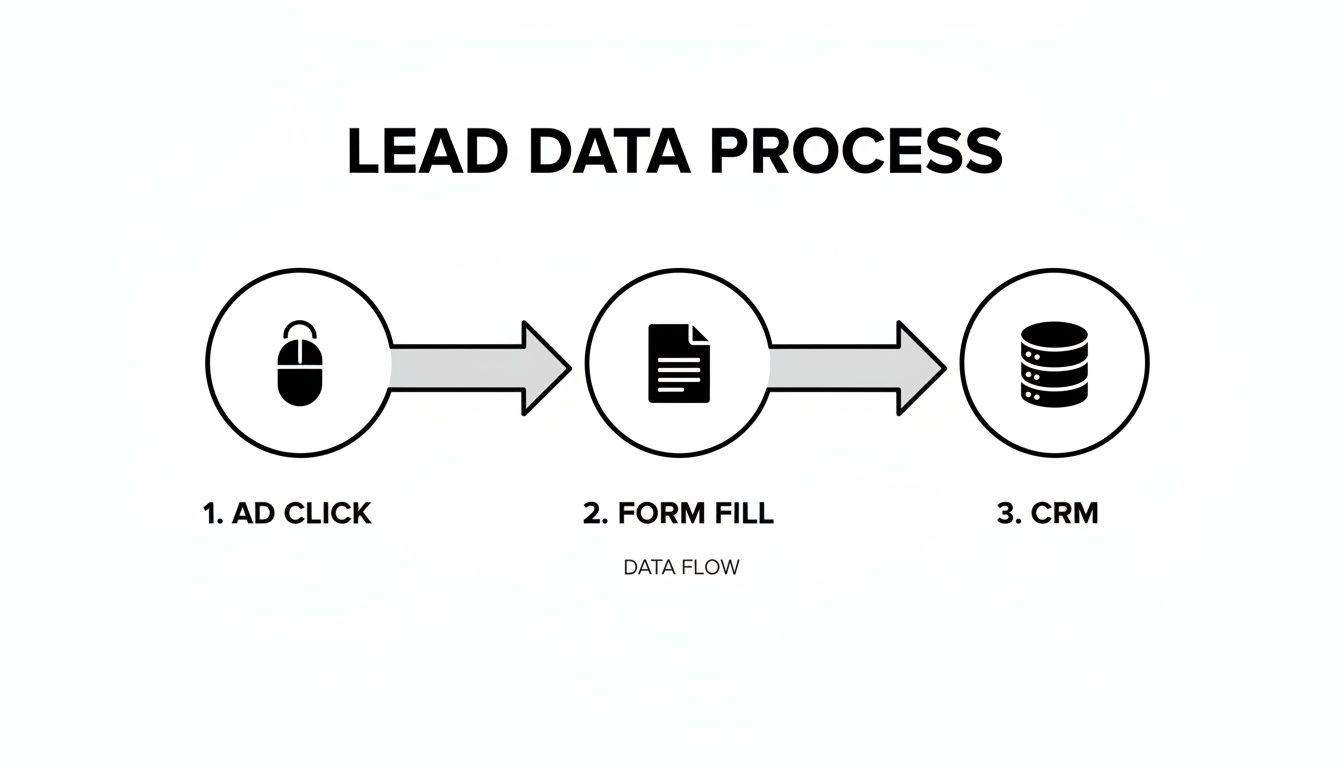
As you can see, grabbing that attribution data right at the form submission stage is non-negotiable. It's the critical link between your online ads and your offline sales.
Getting Your Conversion Data Ready for Upload
The core of this whole process is a simple data file—usually a CSV—that the ad platforms can read. You’ll need to export a list of your recent 'closed-won' deals from your CRM, but you can't just dump everything. The upload will only work if you provide a clean, specific set of data points.
At a minimum, your export file needs to have these key details for every conversion:
- The Unique Click ID: This is the GCLID for Google Ads or the FBCLID for Meta. It's the absolute must-have that ties the sale back to a specific ad click.
- A Clear Conversion Name: This needs to match the conversion action name you created in your ad account, like 'New Customer Purchase' or 'Signed Contract'. Consistency is everything.
- The Exact Conversion Time: The ad platforms need to know precisely when the deal was closed to attribute it correctly within the conversion window.
- The Deal's Value: If your sales have a monetary value, you absolutely want to include it. This is how you calculate your true Return on Ad Spend (ROAS).
Without these pieces, the ad platform has no idea how to match your sale to its own records. Nailing this export is the most important part of the manual upload.
The Manual Upload Process for Google and Meta
Once you have your perfectly formatted CSV file, you’re ready to upload it. Both Google Ads and Meta have dedicated spots within their platforms for importing offline conversions. The process is pretty similar for both, and it all comes down to mapping the columns from your file to the fields the platform is looking for.
Let's imagine a real-world scenario. You just closed a deal in Salesforce for a lead that came from a Google Ad three weeks ago. You’ve checked their contact record and, sure enough, it contains the GCLID you captured with a hidden form field.
Here’s what you’d do next:
- Export from Your CRM: You'd run a report in Salesforce for all deals closed in the last 24 hours that have a GCLID. Your export would include columns for the GCLID, the deal value, and the 'closed-won' date and time.
- Find the Upload Section: In Google Ads, you’ll navigate to
Goals > Conversions > Uploads. In Meta Ads Manager, you’ll find a similar option underEvents Manager. - Upload and Map Your File: You'll upload your CSV, and the platform will prompt you to match your column headers (e.g., "GCLID," "Deal Value") to its required fields ("Google Click ID," "Conversion Value").
Once you hit 'confirm,' the data is sent to the ad platform. It usually takes about 24-48 hours to process. After that, you’ll start seeing your offline sales appear directly in your campaign reports.
Don’t underestimate the importance of consistency. Manual uploads are not a one-time thing. For the ad algorithms to learn and optimize effectively, they need a steady stream of data. I always recommend my clients aim for daily uploads, or at the very least, a consistent weekly schedule.
Manual Data Mapping for Offline Conversion Uploads
To make the upload process smoother, you need to know exactly which CRM fields correspond to the required columns in Google and Meta. Think of it as translating your data into a language the ad platforms understand.
Here’s a simplified guide to mapping your CRM export fields to the required columns for Google Ads and Meta Ads offline conversion imports.
| Data Point | Your CRM Field (Example) | Google Ads Column | Meta Ads Column |
|---|---|---|---|
| Click Identifier | GCLID or FBCLID |
Google Click ID |
match_keys.fb_clid |
| Conversion Name | Conversion Action |
Conversion Name |
event_name |
| Conversion Time | Deal Closed Date |
Conversion Time |
event_time |
| Conversion Value | Deal Amount |
Conversion Value |
custom_data.value |
| Currency | Deal Currency |
Conversion Currency |
custom_data.currency |
This table is just a starting point. Your CRM field names will likely be different, but the principle is the same: match your source data to the platform's destination field. Getting this right is the key to a successful upload.
Sidestepping Common Upload Errors
This manual process sounds straightforward, but it’s surprisingly easy to trip up. A few common snags can cause your uploads to fail, and knowing about them ahead of time will save you a ton of headaches.
One of the most frequent culprits is incorrect date and time formatting. Ad platforms are incredibly picky about this. They might require a specific format like MM/dd/yyyy HH:mm:ss, so always double-check their documentation and make sure your CRM export matches it perfectly.
Another common pitfall is just plain old bad column mapping. If you accidentally map your "Conversion Value" column to the "Conversion Time" field, the upload is going to fail. Take an extra minute to carefully review your mapping before you confirm the import. Keeping a close eye on your marketing lead tracking data can help you spot these kinds of inconsistencies before they become a problem.
Why This Manual Effort Is Worth It
I get it. Looking at this process, it's easy to think it sounds tedious—and honestly, it can be. But the value it unlocks is enormous.
Here’s a startling reality: without offline conversion tracking, you could be blind to the true performance of up to 50% of your marketing efforts. This is because so many leads from online ads convert offline, often days or weeks later. This data gap leads to wasted ad spend and optimizations based on incomplete information.
By manually uploading your sales, you're giving the ad algorithms the precise feedback they need to do their job. They stop optimizing for cheap, low-quality leads and start hunting for high-value customers. This fundamentally improves the efficiency of your ad spend and finally gives you a clear, accurate picture of your marketing ROI.
Common Tracking Pitfalls and How to Sidestep Them
Setting up offline conversion tracking is a huge win for any marketer, but let's be honest—it's rarely a set-it-and-forget-it affair right out of the gate. You're likely to hit a few snags. Knowing what to look for ahead of time can turn a potential data catastrophe into a simple fix, keeping your tracking sharp and your insights trustworthy.
The Mystery of Mismatched Data
One of the most common frustrations I see is a high rate of data matching errors. You’ve done all the work: you captured the GCLID, logged the new customer in your CRM, and diligently uploaded your conversion file. But when you check your ad account, Google or Meta says it could only match a tiny fraction of your sales to an ad click. What gives?
More often than not, the culprit is a stripped URL parameter. Sometimes, a website platform or a redirect rule will accidentally chop off the ?gclid= part of the URL before the page even finishes loading. When that happens, your hidden form fields capture nothing, the lead hits your CRM without that vital tracking ID, and the attribution chain is broken for good.
Making Sure Your Click IDs Arrive Safely
Here's a quick way to check for this. Go click on one of your own live ads. The second you land on your site, look at the URL in your browser's address bar. Do you see the gclid= parameter? If it’s missing, it's time to investigate your website's redirect settings or look for any third-party scripts that might be meddling with the URL.
Another thing to plan for is leads that arrive without a click ID. What about the person who found you through an organic search, was sent over from a partner site, or just typed your URL in directly? They won't have a GCLID or FBCLID. You can't upload these as offline ad conversions because there was no ad click to connect them to, but capturing this information in your CRM is still incredibly valuable. It helps you build a complete picture of which channels are really bringing in your best customers, even if you can't feed that specific data back to Google Ads.
Respecting Conversion Windows and User Privacy
Time is another factor that trips people up. Ad platforms have what's called a conversion window—the maximum amount of time allowed between an ad click and a conversion for it to be counted. For Google Ads, this is typically up to 90 days.
If your sales cycle drags on longer than that, a sale that closes on day 100 won't get matched to the original click, even with a perfect GCLID. That isn't a tracking error on your part; it's just a limitation of the platform. Understanding this from the start helps you set realistic expectations for the data you'll see in your ad reports.
The goal of offline conversion tracking isn't to build a perfect, all-encompassing internal attribution model. It's about sending better signals to your ad platforms so they can find you more customers. Focus on consistently uploading the data that can be matched to make your campaigns smarter.
And, of course, privacy and compliance are non-negotiable. Regulations like GDPR and CCPA mean you have to be upfront about the data you collect. When you track offline conversions, you're connecting user data (like click IDs) to personal information in your CRM.
To stay on the right side of the law, you absolutely must:
- Update your privacy policy. Be clear that you're collecting data to measure and personalize ad campaigns.
- Check your cookie consent banner. Make sure it properly covers the scripts and cookies needed to capture this attribution data.
Finally, a huge pitfall is simply not grasping the true impact of this data. The industry is slowly waking up to the fact that 60-70% of customer journeys involve both online browsing and an offline close, a gap that leaves most marketers in the dark. This blind spot leads to completely skewed ROI calculations.
Thankfully, Google's import process now accepts conversions up to 90 days after the click, which is a lifesaver for B2B companies with longer deal cycles. When you track this data correctly, you uncover powerful insights—like finding out that referral traffic actually drives far more revenue than some of your paid channels. You can learn more about how to leverage these offline conversion insights on KlientBoost.com.
Getting ahead of these challenges—from technical glitches to privacy rules—is what separates a messy implementation from a truly successful offline tracking strategy.
Automating Your Tracking for a Hands-Off Approach
Let's be honest, after wading through the manual upload process, you can see the power in it. But you can also see the grind. Exporting CSV files and wrestling with column mapping every single day? It's not just tedious; it's a huge time-suck that pulls you away from actual strategy.
Thankfully, there's a much smarter way to get all the benefits of offline conversion tracking without the daily manual labor.
This is about setting up a system that just works in the background. It’s the "set and forget" dream for any marketer who needs solid data but doesn’t have time to add another recurring task to their plate.
How Modern Attribution Tools Work
The secret sauce is a specialized marketing attribution tool like LeadPulse. Instead of you trying to connect the dots manually, these tools handle it for you from the very first click. The setup itself is refreshingly simple.
You start by adding a small snippet of code to your website, much like you would with Google Analytics. Once it's there, the script immediately starts monitoring every visitor.
When someone clicks one of your ads, the script instantly grabs all the critical attribution data, including things like:
- The Click ID: It automatically captures the GCLID, FBCLID, or other unique identifiers right from the URL.
- The Channel: It knows if the visitor came from Paid Search, Organic Social, or a referral link.
- The Campaign Details: It logs the exact campaign, ad group, and even the keyword that brought them in.
- The Landing Page: It remembers the first page the visitor landed on, giving you clues about what content is working.
All this information gets stored in the visitor’s browser. When that person finally fills out a form on your site, the tool seamlessly passes all that captured data into hidden fields within the form. It's completely invisible to the user but incredibly valuable for you.
Creating a Seamless Data Flow
Once that form is submitted, the complete attribution dataset flows directly into your CRM, attached to the new lead's contact record. Suddenly, every new entry in HubSpot, Salesforce, or Pipedrive is instantly enriched with precise origin data.
Your sales team can now see that a lead came from a specific Google Ads campaign targeting a particular keyword. That context is gold for their initial outreach.
The real beauty here is that you completely sidestep the human error and data loss that plague manual processes. Every lead gets tracked, every single time, without fail.
From there, the last piece of the automation puzzle snaps into place. Most modern CRMs have native integrations with the major ad platforms. You can set up a simple rule in your CRM to automatically send conversion data back to Google Ads or Meta whenever a deal's status changes to 'closed-won.'
This creates a perfect, hands-off loop. A visitor clicks an ad, the tool captures the data, it flows into your CRM, and when a sale happens, the CRM alerts the ad platform. Your offline conversion tracking is now running on autopilot.
The True "Set and Forget" Advantage
This automated approach turns offline conversion tracking from a daily chore into a one-time setup. You put in a little time upfront to get the script installed and configure your tools, and from that moment on, the system hums along on its own.
Think about it: a marketing agency can set this up for a client and have total confidence that accurate sales data is constantly feeding the ad algorithms. That means better campaign performance and happier clients, all without someone needing to intervene daily.
This frees you up to focus on what actually matters—analyzing the insights and making smart, strategic decisions instead of wrestling with spreadsheets. This is how you unlock the real, sustainable power of offline conversion tracking.
Your Offline Conversion Tracking Questions Answered
Alright, let's tackle some of the common questions that always come up when you're first dipping your toes into offline conversion tracking. Getting these sorted out from the start will save you a ton of headaches down the road.
How Long Until My Offline Conversions Show Up?
This is usually the first question I get. You've gone through the trouble of uploading your sales data, you hit refresh, and… nothing. So, why aren't your conversions appearing in Google Ads or Meta Ads instantly?
It's a great question, but the process isn't like tracking a simple website click. Expect to see your offline conversions pop up in your reports within 24 to 48 hours. There's a bit of a delay because the ad platforms have to do some heavy lifting behind the scenes. They need to take your file, process it, and match each unique click ID (like a GCLID or FBCLID) against their massive database of ad clicks. A little patience is key here.
Can I Track Sales From Organic or Direct Traffic, Too?
This is a smart question because it gets right to the heart of attribution. You've set everything up correctly, and now your CRM is showing you that sales are coming from all over—organic search, social media, direct visits. Can you upload those conversions to your ad platforms?
The short answer is no. Offline conversion tracking is built specifically for paid ads. It works by matching a unique click ID generated only when someone clicks one of your ads. Since organic or direct traffic doesn't produce a GCLID or FBCLID, there’s simply nothing for Google or Meta to connect the sale to.
Here's the takeaway: While you can't upload non-ad conversions, capturing that data in your CRM is still a huge win. It gives you that complete, 360-degree view of which channels are actually making you money, not just driving clicks.
This is the kind of insight that shapes a truly effective marketing strategy, letting you see well beyond just your paid campaigns.
What Happens If a Customer Clicks Multiple Ads Before Converting?
Let's be real, customer journeys are messy. Someone might click a Google Search ad on Monday, see a Facebook retargeting ad on Wednesday, and finally convert after clicking a LinkedIn ad on Friday. When you upload that sale, which ad gets the credit?
The good news is you don't actually have to figure this out yourself. The ad platforms handle it for you automatically based on the attribution model you’ve already chosen in your ad account.
- If you’re using a Last-Click Model, the very last ad they clicked gets 100% of the credit. Simple.
- If you're on a Data-Driven Model, the platform intelligently splits the credit across the different touchpoints that influenced the sale.
You don't need to change a thing. Just upload the conversion, and the platform takes care of the rest, making sure the credit is assigned according to your settings. This way, your reporting stays consistent, and you get an accurate read on your campaign performance, no matter how winding the path to conversion was.
Ready to automate this entire process and get crystal-clear attribution without all the manual uploads and spreadsheets? LeadPulse automatically captures marketing attribution data and sends it straight to your CRM. You'll finally see exactly where your leads, customers, and revenue are really coming from.
A Simple Guide to Facebook UTM Parameters
Tired of guessing which ads work? This guide makes Facebook UTM parameters simple, helping you track every click and prove your marketing ROI without code.
Unlock Your Marketing ROI with Customer Journey Tracking
Stop guessing where your best leads come from. This guide to customer journey tracking shows you how to connect marketing efforts to sales without writing code.