Improve Lead Conversion: A Practical Audit to Boost Your Pipeline
If you want to improve lead conversion, you first have to figure out where you’re losing people. The only way to do that is to map the entire journey a lead takes, from the moment they land on your site to when they fill out a form and, hopefully, end up in your CRM. By finding these "leaky buckets," you can focus your effort on the fixes that will actually make a difference.
Auditing Your Current Lead Flow to Find Leaks
You can't fix a problem you can't see. I've worked with countless businesses that were losing potential customers at different points in their funnel, often because of a broken integration or missing data they didn't even know about.
An audit isn't some deep, technical dive. It's really just about putting yourself in your customer's shoes and walking through the process yourself. Before you even think about tactics like understanding the secrets of conversion psychology, you need to make sure the pipes aren't broken.
This simple exercise helps answer some pretty critical questions:
- Does the info a user submits on a form (like from Typeform or Gravity Forms) actually show up correctly in your CRM (like HubSpot or Salesforce)?
- Is essential marketing data, like UTM parameters, being captured with every single lead?
- Are there technical hiccups, like a broken submit button or a painfully slow landing page, that are frustrating users and causing them to leave?
Mapping the Customer Journey
The best way to start is to become a lead yourself. Pick one of your marketing campaigns—a Google Ad, a link from a social media post, whatever—and follow the exact path. Click the ad, land on the page, fill out the form, and then pop over to your CRM to see what actually came through.
This flowchart shows the basic path every lead should take. It seems simple, but each step is a potential point of failure.
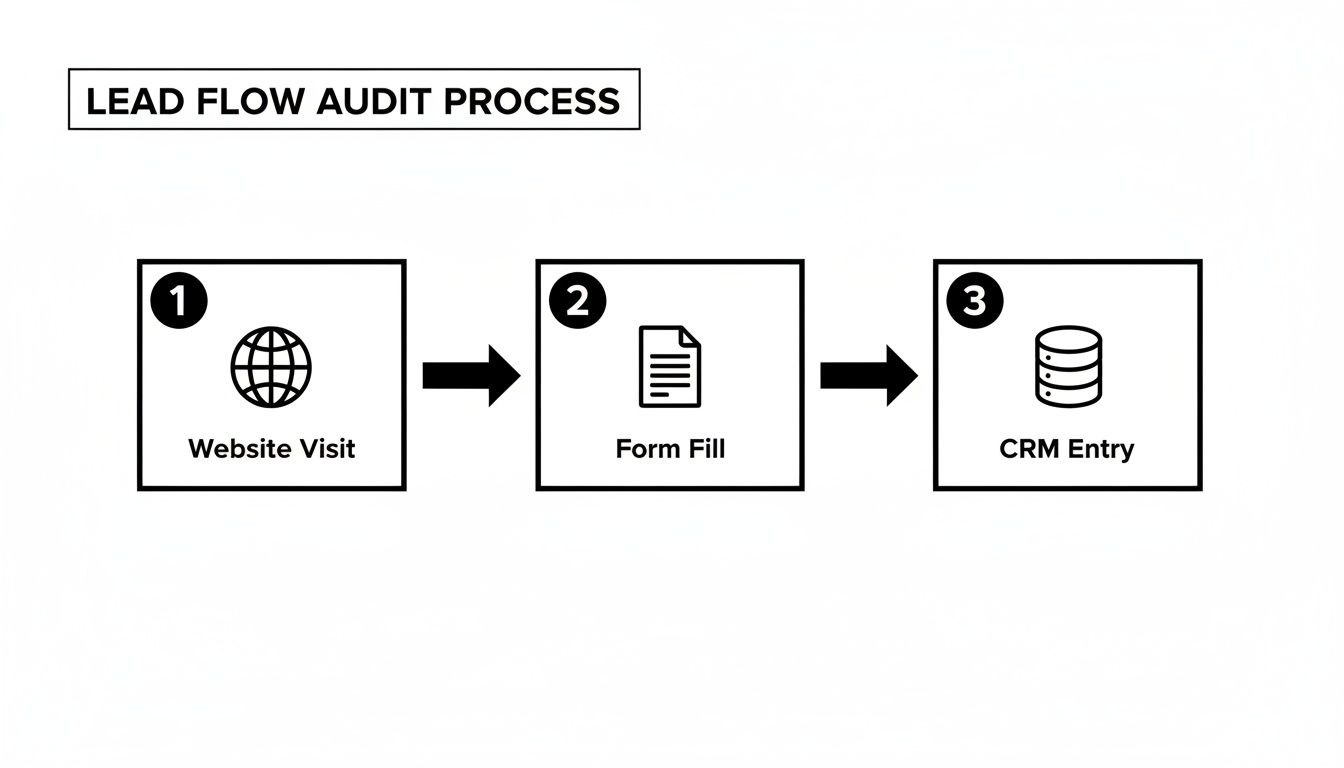
As you go through this test, you're looking for disconnects. For instance, did the "Lead Source" field in your CRM correctly say "Google Ads"? Or is it blank? If it's blank, you've got a data gap. This is an incredibly common problem that makes it impossible for marketers to prove which channels are actually bringing in good leads.
My Two Cents: A manual walkthrough of your lead flow is the fastest way to find hidden problems. You'll often uncover simple-to-fix issues—like a misconfigured form field or a wonky CRM integration—that are having a huge negative impact on your conversions.
Identifying Common Blind Spots
While you're playing secret shopper, keep an eye out for the usual suspects that kill conversions. These are the blind spots where potential revenue just vanishes.
Here’s what to look for:
- Missing UTM Data: A lead shows up in your CRM, but you have no clue they came from your big LinkedIn campaign. Without that data, good luck proving your marketing ROI.
- Inconsistent Tracking: The form on your homepage works perfectly, but the one on your "Request a Demo" page doesn't capture any UTMs. This kind of inconsistency makes your data messy and unreliable.
- Broken Integrations: Your form builder is supposed to push leads into your CRM automatically, but something's not working. Leads either get lost completely or have to be entered by hand, which is slow, tedious, and often leads to errors.
Fixing these leaks is step one. If you want to get more systematic about it, our guide on sales funnel analysis offers a more structured way to diagnose these issues. By plugging these holes first, you’re building a solid foundation for everything else you do to improve conversions.
Using Marketing Attribution to Find Your Best Channels

So, you’ve plugged the obvious leaks in your lead flow. What now? It’s time to get strategic and figure out where your best leads are really coming from.
This might sound like a no-brainer, but it's incredible how many businesses get fixated on traffic volume instead of lead quality. Not all traffic is created equal. A lead who clicked a super-targeted LinkedIn ad is worlds apart from someone who stumbled upon your site from a vague Google search.
The data backs this up. While the average global e-commerce conversion rate hovers around 3.34%, the top players are hitting over 11%. That's a massive 3.3x performance gap. How do they do it? They know exactly which channels bring in high-intent buyers, and they pour their resources into those winners. You can find more of these conversion rate statistics on rockingweb.com.au.
If you want to genuinely improve lead conversion, you absolutely have to connect your marketing activities to actual sales. That, in a nutshell, is marketing attribution.
Looking Beyond Surface-Level Metrics
It’s easy to get excited when you see a social media campaign driving thousands of visitors in your analytics report. Looks like a home run, right? But if not a single one of those visitors ever fills out a form or becomes a customer, was it really a success?
This is where attribution cuts through the noise. It stops focusing on just clicks and sessions and starts connecting the dots between where a person came from (the ad, the blog post, the referral) and what they ultimately did (signed a contract, made a purchase). It finally answers the one question every marketer needs to know: "What's actually making us money?"
And for those who aren't technical, don't worry. This doesn't require a complex, custom-coded setup anymore. Modern tools can grab this data automatically the second a visitor hits your site and pass it straight into your CRM along with their form submission.
A Real-World Scenario
Let's look at a typical small B2B company. Imagine they're running two different campaigns: one is a big-budget Google Ads campaign targeting broad keywords, and the other is a more focused, organic content strategy on LinkedIn.
- Google Ads: Pulls in 200 leads every month.
- LinkedIn Content: Only generates 20 leads a month.
At first glance, Google Ads is the clear winner. But when you follow those leads all the way through the sales pipeline, the story completely flips.
Let’s put that into a simple table to see the difference clearly.
Lead Source Performance Comparison
| Marketing Channel | Leads Generated (Monthly) | Sales-Qualified Leads | Final Conversion Rate |
|---|---|---|---|
| Google Ads | 200 | 10 (5%) | 0.5% (1 sale) |
| LinkedIn Content | 20 | 10 (50%) | 25% (5 sales) |
Suddenly, the picture is much different. The Google Ads campaign, despite its high volume, barely produced a qualified lead. On the other hand, the "small" LinkedIn effort generated five high-value customers.
This is a classic example of why lead volume is a vanity metric. True growth comes from finding the channels that deliver quality, not just quantity. The goal isn't just getting more leads; it's getting more of the right leads.
With this simple attribution data in hand, the company can now confidently shift its budget. They can dial back the low-performing ads and double down on creating the kind of content that attracts their ideal customer on LinkedIn. This is what smart, data-driven marketing looks like in practice.
For a deeper dive into getting this set up (without needing to be a tech wizard), check out our full guide on marketing channel attribution.
Optimize Your Forms to Get More Submissions
Think of your form as the final handshake. It’s that critical moment where a curious visitor decides to either give you their information or simply leave your site forever. If your form is a long, confusing mess, you've already lost them. The good news is that you can dramatically boost your form submissions with a few simple tweaks—no developer required.
It all boils down to one word: friction. Every single field you add, every confusing question you ask, is another reason for someone to give up and bounce.
The goal is to make your form feel less like an interrogation and more like the start of a helpful conversation. Make it easy, make it clear, and make it fast.
Reduce Friction and Build Trust
First things first, take a hard look at your form and be ruthless. Cut it down to the absolute essentials. Do you really need their phone number, company size, and job title right out of the gate? Probably not. You can always ask for more details later on as you build the relationship.
For now, focus on these small but mighty changes:
- Fewer Fields: The data doesn't lie. Studies have shown that cutting form fields from 11 down to just 4 can boost conversions by a staggering 120%. Just ask for the basics, like name and email.
- Clear Labels: Don't get clever. Use simple, direct labels that sit right above each field. Never use placeholder text as a label—it vanishes the second someone starts typing, which is incredibly frustrating.
- Trust Signals: Add a quick privacy note directly under the email field, like "We'll never share your email." This tiny bit of text goes a long way in reassuring people that their information is safe with you.
- Smart Defaults: If you can pre-fill information or use smart defaults (like guessing a country based on their location), absolutely do it. Every click you save for the user is a win.
A huge part of this is also mastering what is a Call to Action (CTA) on your submit button. A button that says “Get My Free Guide” is always going to perform better than a lazy, generic “Submit.”
Platform-Specific Tips for Non-Technical Users
You don’t need to be a coding wizard to make these improvements happen. Most modern tools give you all the control you need.
For WordPress & Webflow Users: If you're using a popular plugin like Gravity Forms or Contact Form 7, it's time to dive into the settings. You can easily drag and drop to remove fields, change the button text, and even enable cool features like conditional logic. This lets you show or hide fields based on someone's answers, making the form feel dynamic and way less intimidating.
For Typeform & Jotform Users: These tools are fantastic because they're built for creating conversational, one-question-at-a-time forms. Lean into that. Breaking the process down into small, manageable bites feels so much less overwhelming than staring at a long, single-page form.
By focusing on these small, human-centric adjustments, you can turn your forms into a powerful engine for lead generation. If you want to go even deeper, check out our guide on form design best practices for more actionable strategies.
What Happens After They Hit "Submit"? Crafting a Follow-Up That Converts
Getting that "New Lead" notification is a great feeling. But here’s the hard truth: capturing the lead is just the starting line. The real work—and where most revenue is won or lost—happens in the moments, hours, and days that follow.
This is all about lead nurturing. Without a smart follow-up plan, you're essentially letting good leads go cold. It’s a massive missed opportunity, especially when you consider that a shocking 79% of marketing leads never convert, mostly because nobody bothered to nurture them.
This is where all that clean attribution data we've been talking about becomes your superpower. When you know exactly where a lead came from, you can craft a follow-up that feels personal and relevant, which dramatically boosts your chances of turning them into a customer.
Tailor Your Follow-Up to the Source
Let’s be honest, a generic "Thanks for your submission" email is a dead end. It’s impersonal and instantly forgettable. To start a real conversation, you have to meet people where they are, using the context of how they found you.
Just think about how different these two leads are:
Scenario 1: The LinkedIn Ad Lead. Someone clicks your ad for a "B2B SaaS Guide." They're in research mode, actively looking for solutions. Your first email needs to deliver that guide immediately. But you can go a step further and reference the source: "Hope you find the B2B SaaS guide you requested from our LinkedIn post useful!" This small touch makes a huge difference.
Scenario 2: The Organic Search Lead. This person Googled "how to improve lead conversion" and found your blog. They see you as an expert. Your follow-up should lean into that. Instead of a hard sell, send them links to a few more related articles or invite them to a webinar on the topic. You’re reinforcing your credibility and being genuinely helpful.
This isn't complicated stuff. It’s just about paying attention. Personalizing your approach based on the lead's source transforms a cold, automated touchpoint into the beginning of a warm conversation.
A lead from a specific campaign is telling you exactly what they're interested in. Use that information to tailor your follow-up and prove you have the solution to their specific problem.
Build a Simple, Effective Welcome Sequence
The first few emails are your best chance to build momentum. You don't need a complex, 20-step workflow right away. A simple, automated sequence can work wonders by consistently providing value and building trust from day one.
Here’s a basic three-email sequence that I’ve seen work time and time again. You can set this up in almost any email tool.
- The Instant Delivery (Send within 5 minutes): This is non-negotiable. Deliver whatever you promised—the guide, the webinar link, the checklist—immediately. Speed is everything here.
- The Helpful Tip (Send 2 days later): Follow up with a short email that shares a quick tip or a mini-case study related to their original interest. The key is to focus on their problem, not your product.
- The Gentle Nudge (Send 4 days later): End the initial sequence with a simple, open-ended question. Something like, "Was that guide helpful?" or "Are you running into any of these challenges right now?" is perfect. It’s a low-pressure way to invite a reply and open the door for a real conversation.
The data backs this up. Companies that get lead nurturing right generate 50% more sales-qualified leads at a 33% lower cost. Even better, nurtured leads are 47% more likely to make a purchase. You can dig into more of these powerful lead generation statistics at seoprofy.com.
By simply personalizing and automating your first few touchpoints, you can systematically improve lead conversion and start turning more of those hard-won prospects into happy, paying customers.
Focusing on High-Impact Channels Like LinkedIn
Once you have clean attribution data flowing into your CRM, the guesswork stops. You can finally make confident, data-backed decisions about where to put your time and marketing dollars. For most of the B2B businesses, coaches, and consultants I work with, this means shifting focus away from broad, high-volume channels and doubling down on platforms where high-intent buyers actually spend their time.
LinkedIn is a classic example. While other social platforms are great for general brand awareness, LinkedIn is built from the ground up for professional networking. It’s a goldmine for quality B2B leads. A scattergun approach across every social media site is a recipe for wasted effort; a targeted strategy on the right platform is how you truly improve lead conversion.
Why B2B Loves LinkedIn
Think about the user’s mindset. When someone is scrolling through LinkedIn, they're already in a business frame of mind. They aren't there for vacation photos or memes; they're looking to learn, network, and solve professional challenges. This context makes them far more receptive to your message than a user on a more casual platform.
The numbers back this up, and they're pretty staggering. Research shows LinkedIn is 277% more effective for lead generation than Facebook and X (formerly Twitter) combined. When you need to get in front of a specific decision-maker in a specific industry, no other platform even comes close. You can dig into more of these LinkedIn lead generation statistics on sopro.io.
This isn't just a hunch. If you're selling to other businesses, focusing your energy on LinkedIn is essential for efficient growth.
Leveraging LinkedIn Lead Gen Forms
One of the best tools in your LinkedIn toolkit is the Lead Gen Form. These are native forms that pre-fill with a user's profile information, which dramatically cuts down on the friction of becoming a lead. Someone can send you their details with just a couple of clicks, all without ever leaving the LinkedIn app.
The result of this seamless experience is pretty incredible.
LinkedIn Lead Gen Forms boast an average conversion rate of 13%. That’s more than five times the typical conversion rate for website landing page forms, making them a seriously efficient way to capture high-quality leads.
But here's a common pitfall I see all the time. Leads from these forms often land in a CRM with "LinkedIn" as the source, but that's it. You're left in the dark about which specific campaign, ad, or content piece actually did the work. This makes it impossible to know what's performing and what's not.
This is exactly why connecting your forms to an attribution tool is so critical.
By making sure every lead from a LinkedIn campaign is properly tagged with the campaign name, ad set, and creative, you get a crystal-clear picture of your ROI. This is how you justify ad spend and intelligently scale the campaigns that are driving real business, turning LinkedIn from just another channel into a predictable revenue engine.
Frequently Asked Questions

We've walked through the entire playbook for boosting your lead conversion, from auditing your current flow to fine-tuning your follow-up. Now, let's dig into some of the questions that almost always come up when you start putting this into practice.
How Do I Know if My Lead Conversion Efforts Are Actually Working?
The real proof is in the results, but you have to look past surface-level numbers like website traffic. To see if your work is paying off, you need to connect your marketing efforts all the way through to revenue.
Here are the metrics that truly matter:
- Lead-to-Customer Rate: This is your north star. It answers the simple question: "What percentage of our leads become paying customers?" If this number is going up, you're on the right track.
- Conversion Rate by Channel: Don't settle for a blended, overall conversion rate. You need to know which channels—like Organic Search, LinkedIn campaigns, or specific paid ads—are pulling their weight and delivering leads that close.
- Sales Cycle Length: A great side effect of better lead quality and nurturing is a shorter sales cycle. When you see the time from first contact to a closed deal start to shrink, it’s a strong sign your process is becoming more efficient.
What Is a Good Lead Conversion Rate?
That’s the million-dollar question, isn't it? The honest answer is: it depends. "Good" is completely relative to your industry, your price point, and your sales model.
For example, industries with high-stakes decisions like legal or financial services can see conversion rates north of 7%. On the other hand, a typical e-commerce business might be happy with 3%.
But here's the thing—don't get hung up on industry averages. The only benchmark that matters is your own. The goal is steady, consistent improvement. If you took your lead-to-customer rate from 1% to 2%, you just doubled the effectiveness of your marketing. That’s a huge win.
A "good" conversion rate is simply one that's better than last month's. Focus on making small, iterative changes, measuring the results, and then doubling down on what moves the needle for your business.
Which Tools Are Best for a Non-Technical Marketer?
You absolutely do not need a massive, complicated tech stack to get this done. The key is picking a few smart, user-friendly tools that play nicely together, especially with your website forms and CRM.
Here’s a simple but powerful setup I recommend for marketers who don't live and breathe code:
- A User-Friendly Form Builder: I'm a big fan of tools like Typeform, Gravity Forms, or Jotform. They make it incredibly easy to build professional, high-converting forms without needing a developer.
- A Solid CRM: Your CRM is the heart of your operation. Whether it's HubSpot, Salesforce, or Pipedrive, this is where all your lead data should live.
- An Automated Attribution Tool: This is the missing link that ties everything together. A "set-it-and-forget-it" tool can automatically grab all the UTM and marketing source data from every single form submission and pass it directly into your CRM. It gives you the full picture without any manual data entry.
With just these three pieces, you can build a seamless, automated system for tracking leads from their very first click all the way to a closed deal.
Ready to finally see exactly where your best leads are coming from? LeadPulse captures marketing attribution data and sends it straight to your CRM, giving you the clarity you need to make smarter marketing decisions. Learn more and start your journey with LeadPulse today.
Marketing lead tracking: Connect forms to CRM for smarter pipelines
Discover marketing lead tracking that ties your forms to CRM in minutes. A clear, non-technical guide to boost attribution and conversions.
How to Create a Customer Journey Map (how to create customer journey map)
Discover how to create a customer journey map with this practical guide. Visualize each touchpoint and optimize for real business results.