Mastering the Facebook UTM Parameter for Perfect Ad Tracking
It's one of the most common frustrations for marketers: you pour money into a Facebook ad campaign, the clicks roll in, but your analytics dashboard credits all the new leads to 'Direct' traffic. Sound familiar? This is a classic attribution headache, and the fix is surprisingly simple: the Facebook UTM parameter.
These little tags you add to your URLs act like digital breadcrumbs. They meticulously track every visitor, telling your analytics platform exactly which Facebook campaign, ad set, and creative brought them to your site.
Why Your Facebook Ad Attribution Is Broken
Without proper tracking, you're essentially flying blind. You can see the clicks, sure, but you have no way to connect that activity to actual business results like demo requests, sign-ups, or sales. This disconnect makes it nearly impossible to justify your ad spend, let alone make smart decisions about what’s actually working.
Let's say you're running Facebook ads for a lead generation webinar. You're getting 500 clicks, but your CRM only shows 20 attributed leads. It's easy to conclude that "Facebook isn't working."
But what if you could prove otherwise? By simply adding ?utm_source=facebook&utm_medium=cpc&utm_campaign=webinar_q1 to your landing page URL, you create a direct link between your $2,000 ad spend and every single lead it generates. This isn't a new trick; UTMs have been the gold standard for marketers ever since Google acquired Urchin way back in 2005. They're the key to unlocking precise attribution.
Breaking Down the 5 Core UTM Parameters
To get this right, you first need to understand the five building blocks of any UTM-tagged URL. Each parameter answers a different question about your traffic, painting a crystal-clear picture of your campaign’s performance.
Here’s a quick reference guide to get you started. It covers the purpose of each UTM tag and provides a few real-world examples you can adapt for your own Facebook campaigns.
The 5 Core Facebook UTM Parameters Explained
| UTM Parameter | What It Tracks | Facebook Example |
|---|---|---|
| utm_source | The specific platform sending you traffic. | facebook or instagram |
| utm_medium | The marketing channel or medium. | cpc, paid_social, or social |
| utm_campaign | The name of your overall promotion. | q4_black_friday_sale or new_feature_launch |
| utm_content | Differentiates ads or links within the same campaign. | video_ad_1 or image_ad_blue_cta |
| utm_term | Tracks keywords in paid search, but can be used for targeting details on Facebook. | lookalike_audience_1_percent or interest_marketing |
Think of these five tags as your new toolkit. When you use them consistently, you stop guessing and start knowing. You’ll see exactly which ads are driving revenue and which ones are just wasting your budget.
Key Takeaway: Consistently applying these five tags transforms vague analytics into a precise map. You'll no longer wonder if an ad is working; you'll know exactly how many leads it generated and what its true ROI is.
Of course, tracking a single touchpoint is just the beginning. To truly see how all your marketing efforts work together, it’s crucial to understand multi-channel attribution models. Mastering this gives you a complete view of the entire customer journey, not just the last click.
How to Build Your First Facebook UTM Link

Alright, this is where you really start to take control of your ad tracking. Building your first UTM-tagged link is the moment you stop guessing and start telling a clear story from the initial click all the way to the final conversion. The good news? You don't have to be a tech wizard to pull this off.
You've got two main routes for creating a Facebook UTM parameter: you can do it right inside Facebook Ads Manager, or you can use a separate UTM builder. Both get the job done, but knowing the pros and cons of each will help you figure out what works best for your workflow.
Using Facebook Ads Manager
The most straightforward way is to use the "URL Parameters" tool built directly into Facebook Ads Manager. You'll find this at the ad level when you're setting up a campaign, tucked away in the "Tracking" section. It gives you specific fields for source, medium, and campaign, plus room to add custom parameters for content and term.
Here's what that URL parameter builder looks like inside the platform.
Having dedicated fields for each parameter is a lifesaver. It means you don't have to manually type out that long, messy string of code and risk a typo that breaks everything.
The real game-changer here, though, is the ability to use dynamic parameters. These are little placeholders, like {{campaign.name}} or {{ad.name}}, that Facebook automatically swaps out with the real name of your campaign or ad. If you're managing dozens of ads at once, this feature will save you an incredible amount of time.
Building with a Third-Party Tool
What about links you want to share outside of your paid ads, like in an organic post or a message to an influencer? For those, a third-party UTM builder is your best bet.
Google's free Campaign URL Builder is the go-to for most marketers because it's simple and reliable. You just paste your destination URL, fill in the parameter fields, and it spits out a perfectly tagged URL ready for you to copy and paste. This approach gives you total manual control, which is great for keeping your tracking consistent across all your non-paid channels.
Real-World Example: A B2B SaaS Promotion
Let's walk through a quick example. Imagine you're running a B2B SaaS company and you want to generate leads with a new case study. You're running a video ad specifically targeting marketing managers.
Here's how you'd set up your UTMs:
- Destination URL:
https://yourcompany.com/case-study-success - utm_source:
facebook(This tells you the click came from Facebook.) - utm_medium:
cpc(Short for 'cost-per-click', this clarifies it's a paid ad.) - utm_campaign:
q3_case_study_launch(The name of your overall marketing push.) - utm_content:
video_ad_testimonial(This specifies exactly which ad creative they clicked.)
Put it all together, and your final, trackable URL looks like this:
https://yourcompany.com/case-study-success?utm_source=facebook&utm_medium=cpc&utm_campaign=q3_case_study_launch&utm_content=video_ad_testimonial
Pro Tip: Figure out your naming conventions before you start building links. Seriously. Decide if you're using lowercase, underscores instead of spaces, or a specific date format, and then stick to it. Messy UTMs will always lead to messy data.
This kind of structured tracking isn't just a nice-to-have anymore; it's essential. The use of UTMs exploded after Facebook launched ads back in 2007, and they've only become more critical as ad spending has grown. Today, with Facebook's ad audience hitting 2.28 billion after a 4.3% year-over-year increase, you can't afford to guess what's driving results. Discover more insights about Facebook marketing trends.
Common UTM Mistakes That Corrupt Your Data

Building a UTM link seems simple enough, but it’s surprisingly easy to make small mistakes that can completely corrupt your tracking data. A single typo can make a link useless, leaving you with analytics reports that are messy and unreliable. Honestly, these common slip-ups are why so many marketers struggle to prove the real impact of their Facebook campaigns.
One of the most frequent culprits? Inconsistent casing. Google Analytics is case-sensitive, which means it sees utm_source=Facebook and utm_source=facebook as two entirely different traffic sources. This immediately splits your data and makes it impossible to get a clear picture of your campaign's performance.
Another classic mistake is using spaces in your parameter values. This can break the URL outright. Always stick with underscores (_) or hyphens (-) instead of spaces. It’s a simple rule that ensures your links work and your data stays clean.
The Most Common Data-Killing Errors
Here are the top mistakes I see people make all the time when building their Facebook UTMs. If you can avoid these, you'll save yourself a ton of headaches later.
- Inconsistent Naming: One day you use
fb, the next you usefacebook. This just muddies your reports. Pick a convention and stick to it religiously. - Mixing Up Source and Medium: This is a big one.
utm_sourceshould always be the platform itself (likefacebook), whileutm_mediumdescribes the channel type (likecpcorsocial). - Using UTMs on Internal Links: Never, ever add UTM parameters to links that point from one page of your website to another. Doing this overwrites the original attribution data and makes it look like all your conversions are coming from internal referrals.
Key Insight: The whole point of a UTM is to track where a visitor came from to get to your site. Once they've arrived, you don't need to track them internally with UTMs—that just erases the true origin of their visit.
What About Facebook's fbclid Parameter?
You've probably noticed a parameter called fbclid= automatically tacked onto your URLs. This is simply Facebook's own click identifier, which it uses for its internal conversion tracking and attribution inside the Ads platform.
It's crucial to understand that fbclid does not replace your UTMs. While it helps Facebook's system do its thing, your custom UTM parameters are what feed clean, readable, and organized data into your own analytics tools and CRM. They work together, so don’t be alarmed when you see both.
For a deeper dive, check out our guide on UTM parameter best practices.
Getting this wrong is a bigger problem than you might think. A poor UTM setup is estimated to cause 40% of campaigns to misattribute their revenue. But when you get it right, the payoff is huge. Proper tagging helps you pinpoint exactly what’s working, and some businesses have seen their cost-per-lead drop by an average of 22% just by cleaning up their tracking.
Capturing UTM Data in Your Forms and CRM
Building a perfect URL with a Facebook UTM parameter is a great start, but honestly, it’s only half the job. This next part is where the real payoff is, but it's also where a lot of marketers stumble. A perfectly crafted UTM link means nothing if all that valuable tracking data disappears the second a user hits "submit" on your form.
This is a classic—and super frustrating—problem. UTM parameters only exist in the URL of the first page someone lands on from your ad. If they click over to your "About Us" page or browse a few product pages before filling out a form, that original URL with all your precious tracking data is gone for good. The browser just doesn't carry it with them from page to page.
This is exactly why so many leads from your paid campaigns end up being labeled as 'Direct' or '(not set)' in your CRM. The trail goes cold, and you're left completely in the dark about which ads are actually driving leads.
The Missing Link in Your Attribution Puzzle
So, how do you fix this? The trick is to capture the UTM parameters in hidden fields right inside your lead forms. When someone lands on your site from a Facebook ad, a little bit of code can grab those UTM values from the URL, save them, and then automatically fill in those hidden fields when they finally decide to convert.
This clever step ensures that no matter how much a visitor wanders around your site, their original attribution data sticks with them. When they become a lead, that critical information gets passed right into your CRM along with their name and email.
Key Takeaway: The goal isn't just to get someone to your site with UTMs. The real win is making sure those UTMs are captured with the lead's information. This is what finally connects the dots between your Facebook ad spend and an actual, named lead in your system.
Of course, trying to implement this with custom code or wrestling with Google Tag Manager can get complicated fast, especially if you’re not a developer. It usually involves custom JavaScript that you have to write and, more importantly, maintain over time. That can be a huge headache.
How to Automate UTM Capture and Never Lose a Lead
This is precisely the problem a tool like LeadPulse’s Attributer was designed to solve. Think of it as the missing piece that connects your Facebook ad click directly to a lead in your CRM, all without you ever touching a line of code.
Here’s a quick look at how it works its magic:
- It Captures the Data: The moment a visitor lands on your site from a URL containing a Facebook UTM parameter, Attributer spots those values and grabs them.
- It Stores the Information: It then saves this attribution data in a cookie in the user's browser. This is key, as it means the data stays put as they navigate from page to page.
- It Populates Your Forms: When that visitor finally fills out a lead form anywhere on your site, Attributer automatically writes the stored UTM data into the hidden fields you’ve added.
The result? Every single new lead that lands in your CRM—whether it’s HubSpot, Salesforce, or Pipedrive—shows up with all the original marketing attribution data perfectly attached. You’ll see exactly which campaign, ad set, and creative brought them in.
For a more detailed walkthrough, you can learn how to track leads with any form builder using this method. It takes a complex technical challenge and turns it into a simple, "set it and forget it" solution that works with the tools you already know and love.
Turning Your UTM Data Into Smarter Ad Spend
Getting a Facebook UTM parameter to show up in your CRM is a great first step, but that’s not the end goal. The real magic happens when you start using that data to make better decisions. Raw data is just noise; it’s the insights you extract that turn your ad spend into a real growth engine.
This is how you move past vanity metrics and start answering the questions that actually matter. Is that new video ad really bringing in better leads than the old carousel format? Which ad set is sending you leads that actually close? Answering these questions is what separates spending money from strategically investing it.
From Data Points to Actionable Insights
Let's imagine you run an e-commerce store. You've been running a bunch of different Facebook campaigns, and now you can see the UTM data attached to every single customer in your CRM. Digging in, you spot a pattern: customers who clicked on an ad from your utm_campaign=interest_hiking_gear campaign have a 50% higher lifetime value.
That's not just a neat little fact. It’s a bright, flashing sign showing you exactly where to put your money. You can now confidently shift more budget to that high-performing interest group, knowing it's far more likely to generate long-term revenue.
This whole process—from the first click to the final conversion—is a journey. It’s critical to ensure that valuable UTM data doesn’t get lost along the way.
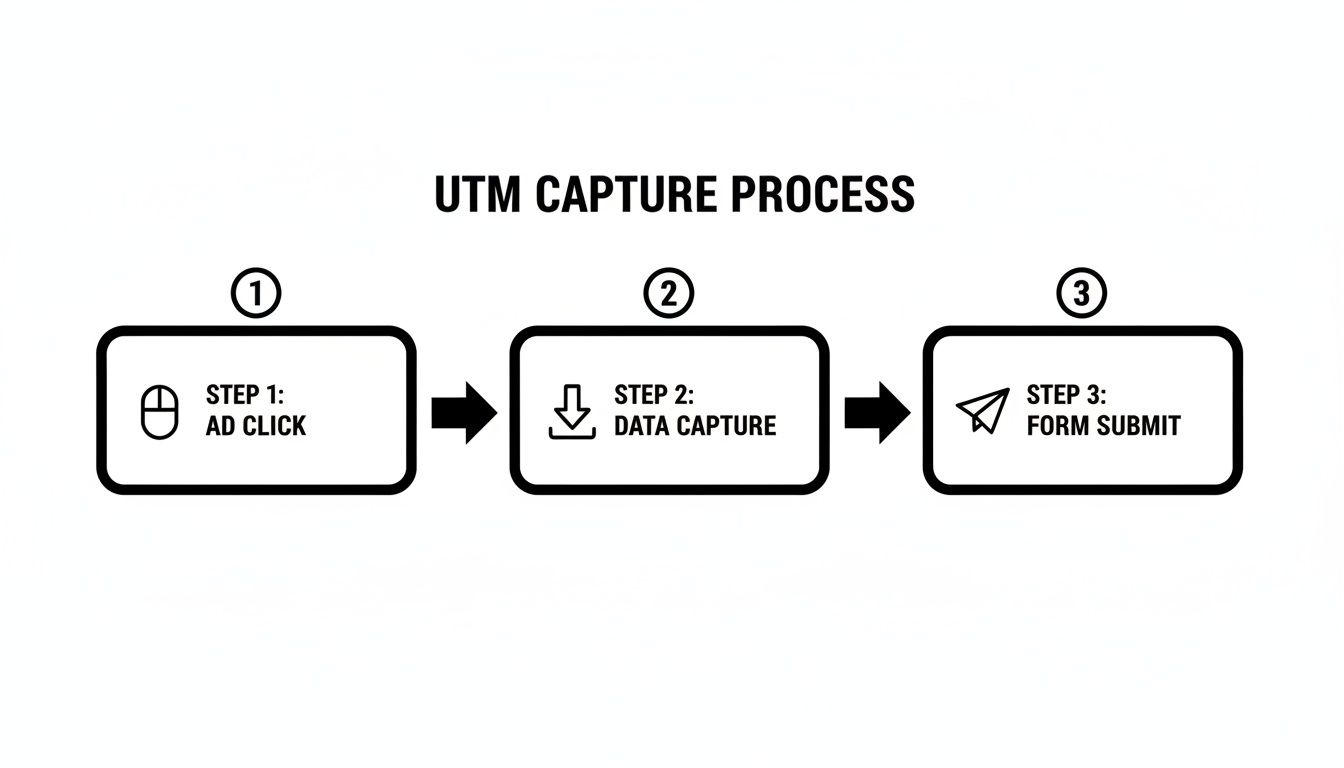
As you can see, having a system to capture and preserve this data through the user's visit is absolutely essential for it to be useful.
Making Confident Budget Decisions
With this level of clarity, you can stop making broad, sweeping changes to your ad account and start optimizing with real precision.
- Creative Optimization: You can finally see which ad creative (
utm_content) doesn't just get clicks, but gets you actual paying customers. - Audience Scaling: Find out which audience (
utm_term) is your most profitable and pour fuel on that fire, while pulling back from the ones that aren't performing. - Campaign Focus: Compare high-level campaigns (
utm_campaign) to see which of your big marketing ideas are actually driving the business forward.
The bottom line is this: Clean UTM data takes the guesswork out of the equation. It gives you the confidence to scale what’s working, kill what isn’t, and build a marketing machine that actually delivers a return.
In the end, mastering the Facebook UTM parameter is all about figuring out how to measure ROI on marketing so you can spend your budget more effectively. If you're ready to take things a step further, check out our guide on multi-touch attribution to see how Facebook fits into the entire customer journey.
Frequently Asked Questions About Facebook UTMs
Diving into the world of the Facebook UTM parameter can definitely stir up a few questions, especially when you're trying to get everything right from the start. Let's walk through some of the most common things marketers ask.
What’s the Difference Between UTMs and Facebook’s fbclid Parameter?
Think of UTMs as your own custom-built tracking system. You create them, you name them, and you get to decide exactly how you want to slice and dice your data. They’re the human-readable tags that tell you precisely which campaign, ad set, or creative brought a lead to your doorstep.
The fbclid parameter, on the other hand, is Facebook’s own thing. It's an auto-generated ID that Facebook tacks onto your URLs for its internal tracking needs, helping it connect ad clicks to conversions within its own ecosystem. While fbclid is crucial for Facebook’s ad reporting, your UTMs are what give you clean, organized, and understandable data inside your own CRM and analytics tools.
Can I Use UTM Parameters on Organic Facebook Posts?
Yes, absolutely! And you really should. It's a fantastic way to finally get a real read on the ROI of your organic content. By adding UTMs to links you share in regular posts, you can prove the value of your social media work beyond just counting likes and shares.
Just remember to change the medium from cpc (cost per click) so you can easily distinguish it from your paid traffic.
For example, you could structure your link like this:
utm_source=facebook&utm_medium=social&utm_campaign=q2_blog_promo. This little setup tells you exactly which organic posts are actually driving traffic, sign-ups, and even sales.
Do I Need a Different UTM Link for Every Single Ad?
You only need a unique link for each thing you want to track separately. Let’s say you’re running an A/B test with two different ad creatives in the same ad set—maybe a video versus an image. In that case, they should have different utm_content values.
The source, medium, and campaign could be identical, but tweaking that one parameter is key to getting good data.
For example:
- Ad 1:
utm_content=video_testimonial_ad - Ad 2:
utm_content=image_carousel_ad
This gives you the granular insight you need to see which creative is actually connecting with your audience and where your budget is best spent.
Why Does My UTM Data Disappear Before a Form Is Submitted?
This is easily one of the most common and frustrating problems we see. Here’s the deal: UTM parameters only exist in the URL of the very first page a user lands on. If they click around your site and visit a few other pages before they fill out a form, that original URL with all your precious tracking data is gone. Web browsers just don't carry those parameters from page to page.
It’s a huge blind spot, and it’s the exact reason marketing attribution tools were invented—to make sure that data gets captured and stored correctly, no matter what the user does.
LeadPulse is built to solve this exact problem. It automatically captures marketing attribution data on that first visit and sends it straight into your CRM. You get to see exactly where your leads and customers came from, all without lifting a finger. You can learn more about how LeadPulse works.
A Simple Guide to Cross-Channel Marketing Attribution
Understand cross-channel marketing attribution without the jargon. Learn how to track every lead from every channel and see what's truly driving your growth.
Master Your Pipedrive Web Form for Smarter Lead Capture
Discover how to use a Pipedrive web form to automate lead capture and track marketing data. A step-by-step guide for non-technical users.