A Simple Guide to Cross-Channel Marketing Attribution
So, what exactly is cross-channel marketing attribution?
Think of it as the process of giving credit where credit is due across all your marketing efforts. Instead of just looking at the very last thing a customer clicked before buying, it helps you see how channels like Organic Search, paid ads, and social media all worked together to make that sale happen. It gives you the full story, which is crucial for making smart budget decisions and understanding what's really working.
Why Marketing Attribution Is So Important

Let's use a sports analogy. Imagine your customer’s journey is like a soccer team driving down the field to score a goal. The striker who kicks the ball into the net gets all the glory, right? But what about the defender who stole the ball, or the midfielder who delivered the perfect pass?
Traditional marketing tracking is a lot like only crediting the striker. It focuses on that final click and completely ignores the teamwork that led to the conversion. For any business, that's a massive blind spot.
Without seeing the full picture, you're just guessing where to put your money. You might keep feeding your budget to the "striker" (that last Google Ad they clicked) while accidentally starving the "midfielders" (like the blog posts or social media ads) that were essential for moving the customer down the field in the first place.
Seeing the Complete Playbook
Cross-channel marketing attribution gives you the entire playbook. It shows you exactly how all your channels—from organic search and paid ads to email newsletters—work in tandem to attract leads and close deals. This isn't just some abstract theory; it's about making smarter, data-driven decisions that grow your business.
When you can see the whole journey, you can finally answer critical questions like:
- Which channels are actually introducing new people to our brand?
- How do our social media posts help support conversions that eventually come from paid search?
- What's the real return on investment (ROI) from our content marketing?
The Financial Impact of an Integrated View
The numbers don't lie. Brands that nail their cross-channel marketing see an average customer retention rate of around 89%, which blows away the 33% rate for companies with disconnected strategies.
Even better, customers who interact with you on multiple channels tend to spend 30% more than single-channel customers. Campaigns that use three or more channels also see a sales lift of about 14.6%.
By understanding the combined effort of your marketing, you stop wasting money on underperforming channels and double down on the strategies that truly drive growth.
When you can finally pipe this rich attribution data directly into your CRM, it's a total game-changer. Your marketing team goes from being a cost center to a predictable revenue engine. To get a better handle on the basics, check out our complete guide on what marketing attribution is.
Comparing Different Marketing Attribution Models
Choosing a cross-channel marketing attribution strategy isn’t a one-size-fits-all deal. Think of attribution models as different rulebooks for giving credit where it's due. Each model has its own logic for assigning value, and the one you pick directly shapes which marketing channels look like your winners.
Getting a handle on these different approaches is the first step toward seeing the real story behind your marketing performance. Some models are super simple, while others paint a much more detailed picture of a customer's winding path to purchase.
Single-Touch Attribution Models
The most straightforward way to assign credit is to give it all to a single moment in time. These models are a breeze to set up and understand, but they often leave out huge parts of the story.
It’s like giving credit only to the player who scored the goal, completely ignoring the incredible assists and teamwork that made it happen.
First-Touch Attribution: This model awards 100% of the credit to the very first interaction a customer had with your brand. It’s fantastic for figuring out which channels are your best lead generators and awareness-builders. If your main goal is to fill the top of your funnel, this model shines a spotlight on your best channels for that.
Last-Touch Attribution: On the flip side, this model gives 100% of the credit to the final touchpoint right before someone converted. This is the most common model and often the default setting in many analytics tools. It’s helpful for identifying your "closers," but it totally ignores all the earlier touchpoints that warmed up the lead.
Relying only on these simple models can lead you to make some poor budget decisions. You might end up cutting a channel that's a beast at creating initial buzz just because it rarely gets the final click.
Multi-Touch Attribution Models
This is where things get more interesting. Multi-touch models recognize that a conversion is rarely the result of a single interaction. Instead, they distribute credit across several touchpoints, giving you a more balanced and realistic view of how your channels are working together.
Comparison of Common Marketing Attribution Models
So, how do these different models stack up? Each one tells a slightly different story about what’s working in your marketing. Choosing the right one depends on what you’re trying to achieve—whether that’s finding new customers, understanding the full journey, or pinpointing what seals the deal.
| Attribution Model | How It Works | Pros | Cons |
|---|---|---|---|
| First-Touch | 100% credit goes to the first touchpoint. | Simple; great for top-of-funnel analysis. | Ignores everything that happens after the first interaction. |
| Last-Touch | 100% credit goes to the final touchpoint. | Easy to track; highlights conversion-driving channels. | Overlooks the channels that nurtured the lead. |
| Linear | Credit is split equally among all touchpoints. | Fair and balanced; values every step. | Can undervalue more influential touchpoints. |
| Time-Decay | More credit goes to touchpoints closer to the sale. | Good for longer sales cycles; values recent actions. | Can devalue important early awareness channels. |
| Position-Based | 40% to first touch, 40% to last, 20% to the middle. | Values both the "opener" and the "closer." | The 40/40/20 split is arbitrary and may not fit all journeys. |
Ultimately, the goal is to move beyond a simple view and see how all your marketing efforts connect. Multi-touch models are the key to unlocking that deeper understanding.
The push toward more sophisticated attribution is picking up speed, especially as privacy changes and the need for better data become more urgent. While about four in ten organizations use some form of multi-touch attribution, a surprising number still lean on last-click.
Here’s a compelling reason to make the switch: moving from last-click to a multi-touch model can boost efficiency by 15–30%, simply by helping you reallocate your budget to the channels that are actually driving results.
Here are the most common multi-touch models you'll encounter:
Linear: This is the simplest of the multi-touch approaches. It just splits the credit equally among every single interaction. If a customer read a blog, clicked a social ad, and then converted from an email, each of those three touchpoints gets 33.3% of the credit.
Time-Decay: This model gives more credit to the interactions that happened closer to the conversion. A click from yesterday will get way more credit than one from three weeks ago. It’s especially useful for businesses with longer sales cycles where recent touchpoints are often more influential.
Position-Based (U-Shaped): This model gives the first and last touches the most love. It assigns 40% of the credit to the first touch, 40% to the last touch, and spreads the remaining 20% across all the interactions in between. It puts a premium on the channels that introduce your brand and the ones that close the deal.
Key Takeaway: There's no single "perfect" attribution model. The best one for you depends entirely on your business goals, sales cycle, and the specific questions you're trying to answer about your marketing performance.
You can dive even deeper into these concepts in our complete guide to the different types of marketing attribution models. Understanding your options is the first critical step toward gaining real insight from your cross-channel marketing.
Common Roadblocks in Tracking Marketing Leads

You’ve poured time and money into crafting great marketing campaigns, driving traffic from all corners of the internet. You log into your CRM, excited to see the results, only to be met with a wall of frustration. Most of your new leads are stamped with "Direct" traffic or, even worse, the source field is completely blank.
Sound familiar? It’s an incredibly common problem, and it blows a huge hole in your marketing attribution. Instead of a clear map showing which channels are working, you’re left flying blind. This isn't just a minor annoyance; it cripples your ability to make smart budget decisions and prove your marketing is actually delivering ROI.
These tracking problems create what I call a data black hole. All that valuable information about where a lead came from follows them to your website... and then vanishes before it ever makes it into your CRM. The good news is, this black hole isn't some unsolvable mystery. It’s usually caused by a few specific, fixable issues that trip up most marketers.
The Problem with Missing UTM Parameters
Let's start with the basics. UTM parameters are little snippets of code you tack onto the end of a URL. Think of them as tiny GPS trackers for your visitors, telling your analytics exactly which ad, social post, or email brought them to you. When they work, they're the bedrock of solid attribution.
But here’s the catch: they are painfully easy to mess up. A simple typo, an inconsistent naming system across your team, or just plain forgetting to add them can break the entire chain. When a UTM is broken or missing, that lead’s journey gets lost and they’re often mislabeled as "Direct" traffic, making it look like they magically typed your website address from memory.
This is a massive deal. With global digital ad spending set to blow past $830 billion by 2025, the stakes have never been higher. Yet, studies show that a staggering 70% of marketers can't confidently connect their campaigns to actual leads or sales. All that spending without proper measurement means you could be burning through your budget and have no idea. You can read the full research about these marketing attribution challenges to see just how widespread this is.
When Form Builders Drop the Ball
Okay, let's say you've mastered your UTMs. They're perfect. You're still not out of the woods. A visitor lands on your site, loves what they see, and fills out your contact form. This is the magic moment—the conversion!
The problem is, most off-the-shelf form builders don't care about your marketing data. They're designed to capture a name and an email, but they completely ignore and discard all the rich attribution information that brought the person there. So, the lead pops into your CRM, but the story of their journey is gone forever.
This disconnect is a primary cause of the data black hole. Your website knows where the lead came from, but your form fails to act as the bridge to get that information into your CRM.
When the connection works, your CRM records should look like this—full of useful data that tells the whole story.
With this information intact, you can finally build reports that show you which channels are really bringing in the best leads.
The Technical Gap Between Your Website and CRM
The final roadblock is the technical gap that exists between your website and your CRM. These two systems just don't speak the same language when it comes to attribution. Passing a name and email is one thing, but sending over detailed marketing source data requires a purpose-built solution.
Without a tool to connect them, you're stuck with two terrible choices:
- Manual Data Entry: Your team wastes hours every week trying to manually investigate where leads came from. It's tedious, slow, and full of human error.
- Inaccurate Reporting: You throw your hands up and just accept that your data is a mess. You're forced to make critical budget decisions based on guesswork and gut feelings.
This technical chasm is where most attribution strategies fall apart. It's not enough to track visitors on your site; you have to build a reliable pipeline to get that tracking data connected to the actual people in your CRM. Solving this one problem is the key to unlocking true cross-channel marketing attribution.
An Automated Approach to Attribution for Marketers
So, how do you solve the attribution puzzle without becoming a data scientist or getting lost in complex analytics dashboards? The roadblocks we've covered—messy UTMs, disconnected forms, and CRM data gaps—are frustratingly common, but they're not impossible to fix. There’s a much simpler, more practical way forward built for the everyday marketer.
Think of it like having a smart assistant working behind the scenes. This assistant silently keeps track of where every single visitor comes from, making sure you never miss a beat. This is the whole idea behind an automated attribution workflow. It’s a "set it and forget it" solution that finally closes that data black hole, and you don’t have to write a single line of code.
This method boils down to three simple, automated steps that happen seamlessly every time someone lands on your website.
How Automated Attribution Works
The process is surprisingly straightforward. As soon as a visitor arrives, a small script on your site captures their original source. It doesn't matter if they came from an organic Google search, a Facebook ad, or a link in a partner's newsletter—the tool instantly grabs and records that starting point.
Next, it neatly stores that information in the visitor’s browser for their entire session, and even across multiple visits. This is huge, because it solves the problem of attribution data getting lost as a user clicks around your site. The original source is always remembered, just waiting for that moment they decide to convert.
Finally, when that visitor fills out a form, the magic happens. The stored attribution data is automatically passed into hidden fields that you’ve added to your form.
This is the crucial bridge that connects your marketing efforts to your sales pipeline. Along with the lead’s name and email, you get the clean, accurate source data like 'Organic Search' or 'Paid Social.'
The best part? This entire process works with just about any form builder out there, whether you're using native forms in Webflow, a WordPress plugin like Gravity Forms, or a third-party tool like Typeform.
The Power of Seamless CRM Integration
The real payoff comes when that lead data hits your CRM. Since the attribution information was passed through hidden form fields, it flows right into your CRM alongside all the contact's other details. No more manual data entry, no more guesswork, and zero technical headaches.
This creates a clean, reliable, and completely automated workflow. Every contact record in your CRM is instantly enriched with the exact marketing channel that brought them to your door.
- For your sales team: They get immediate context on a lead's origin, which helps them tailor their follow-up conversations and build rapport faster.
- For your marketing team: You can finally build reports you actually trust. Just filter leads by source in HubSpot, Salesforce, or Pipedrive to see which channels are driving the highest-quality prospects.
This approach fixes the fundamental disconnect between your website and your CRM. It turns your lead generation process from a series of broken, disjointed steps into a smooth, integrated system where every new lead comes with its complete backstory.
Why This Method Is a Game Changer
For marketers and small business owners who aren't developers, this approach is a revelation. It completely bypasses the need for complex tools like Google Tag Manager or custom JavaScript solutions. Instead of spending weeks wrestling with complicated tracking setups, you can get a tool like LeadPulse running in minutes.
The result is powerful cross-channel marketing attribution that’s actually accessible. You get the data you need to make smarter budget decisions, prove the ROI of your campaigns, and confidently double down on what’s working—all without needing a developer on standby. It’s all about getting accurate reports you can use to genuinely grow your business.
How to Actually Set Up Attribution with Your Forms and CRM
Alright, let's get our hands dirty and move from theory to action. Knowing what attribution models are is great, but the real magic happens when you build a system that automatically pipes clean, useful data right into your CRM.
The best part? You don’t need to be a developer or a data scientist to pull this off.
I'll walk you through a simple, three-stage process that anyone can follow. Think of this as a one-time setup that will finally solve the “where did this lead come from?” mystery for good.
Step 1: Add a Tracking Script to Your Website
First things first, and it’s the easiest part. Automated attribution tools, including our own LeadPulse, work by adding a small piece of JavaScript to your website. This script acts like a smart little greeter at your digital front door, instantly noting how each visitor arrived.
Adding it is usually a quick copy-and-paste job into the header or footer section of your website. Most modern website builders make this incredibly simple.
- WordPress: Just use a free plugin like "Insert Headers and Footers." You can add the code across your entire site without ever having to mess with your theme files.
- Webflow: Head over to your site settings, find the "Custom Code" section, and paste the script right into the "Head Code" area.
Once that script is live, it gets to work immediately, capturing the source of every visitor—whether they found you through Organic Search, clicked a paid ad, saw a social media post, or followed a link from another site.
Step 2: Add Hidden Fields to Your Forms
This step is the absolute key to the whole operation. It’s how we build a bridge for that tracking data to cross from your website into your CRM. For your attribution tool to pass along its findings when someone fills out a form, it needs a place to put that info. That’s where hidden fields come in.
A hidden field is exactly what it sounds like—a form field that the user can’t see. Its only job is to carry data behind the scenes, like a secret note attached to the lead’s submission.
You’ll need to add a few of these to every single lead capture form on your website. Tools like LeadPulse are built to look for specific field names to know where to drop the attribution data. For example, you’ll likely add hidden fields named something like:
lp_channel(for the marketing channel, like Paid Social)lp_source(for the specific platform, like Facebook)lp_campaign(for the campaign name pulled from your UTMs)
Most form builders make this a breeze. You just drag a "Hidden Field" element into your form and give it the right name. To see how this works with different tools, you can check out our detailed guide on how to track leads with any form builder.
This flowchart shows how simple the whole process really is—from capturing the data to sending it through your forms.
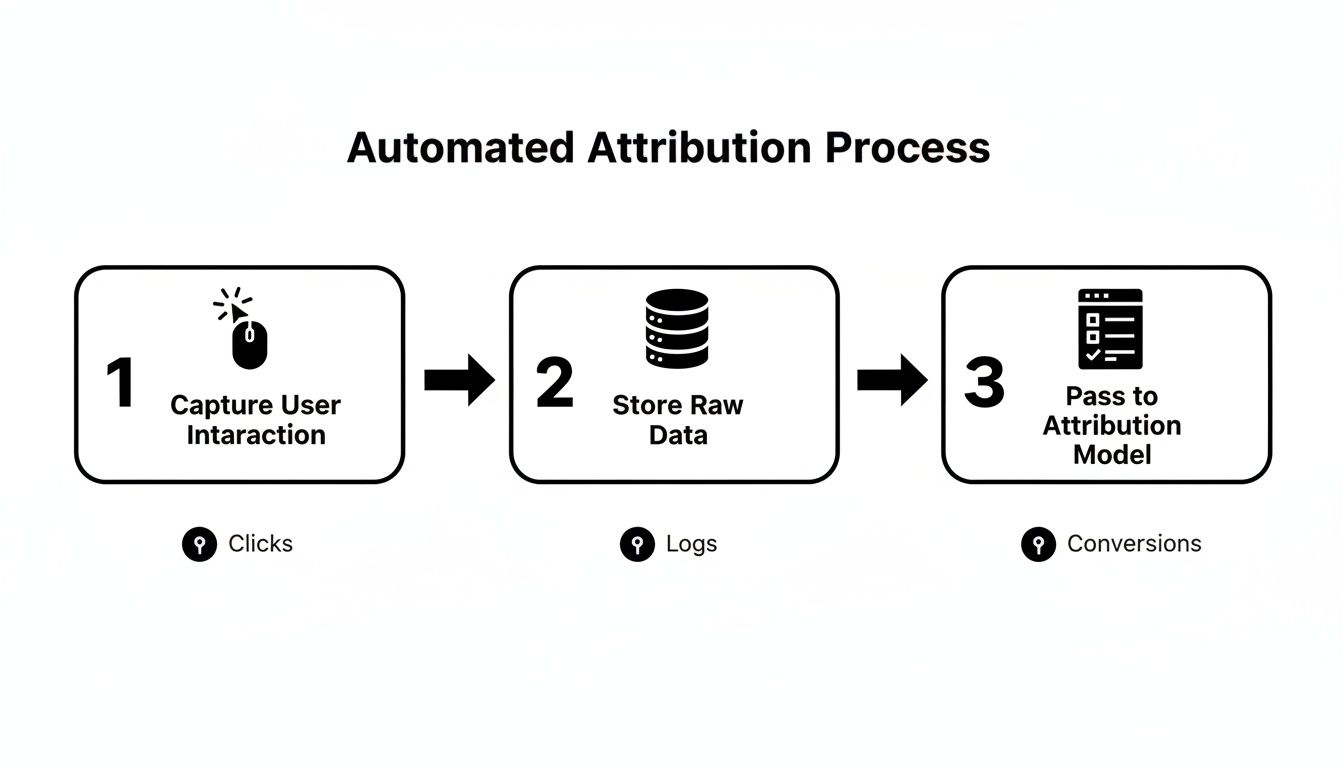
It’s all about creating a smooth, uninterrupted journey for that data, from the first click all the way into your CRM.
Step 3: Map Your Form Fields to Your CRM
The final piece of the puzzle is telling your CRM where to store this new data. This is called "field mapping," and it's less complicated than it sounds. You’re just telling your CRM, "Hey, when you get data from the lp_channel field, please put it in my 'Marketing Channel' property."
When you're ready to connect your forms and CRM, your first move should be finding the best CRM for small business that can handle the kind of data you want to track. Once you’ve got a good platform, the mapping process is pretty straightforward.
Here’s what it would look like in HubSpot, for example:
- Create Custom Properties: First, jump into your HubSpot settings and create a few new contact properties. You might call them "Original Channel," "Original Source," and "Original Campaign."
- Map the Fields: Next, go into your form integration settings. Whether you're using a native HubSpot form or connecting via a tool like Zapier, you'll simply match your new hidden form fields to the new CRM properties you just created.
- Test It Out: Finally, fill out a test form on your website yourself. A new contact should pop up in HubSpot moments later with all the attribution fields perfectly filled in.
And just like that, you've closed the loop. You now have an automated system that captures a lead's origin, passes it through your forms, and neatly files it away in your CRM—all without you lifting a finger.
This simple, three-step process is what makes modern cross-channel marketing attribution so powerful and accessible. It’s a permanent fix for missing source data, giving you the power to make smarter marketing decisions based on reports you can actually trust.
Got a Few Lingering Questions?
Alright, so you're on the verge of setting up a real system for cross-channel marketing attribution. It’s normal to have a few last-minute questions pop into your head. Making the leap from hunches to hard data is a big move, and it's smart to want all your ducks in a row first.
Let's clear up some of the most common questions we hear from marketers. My goal here is to give you the straightforward answers you need to feel confident and ready to go.
"So, Which Attribution Model is Actually the Best?"
This is the big one, isn't it? Everyone wants to know the "best" model, but the truth is, there is no single best model for every business. The right one for you really depends on what you're trying to achieve, how long it takes for a customer to buy from you, and the specific questions you need to answer.
Think of it like this: you wouldn't use a sledgehammer to hang a picture frame. You pick the right tool for the job at hand.
- Need more leads? If your main goal is simply getting your name out there and attracting new eyeballs, First-Touch is your best friend. It clearly shows you which channels are bringing fresh faces to your website.
- Want the whole story? For a balanced, big-picture view, the Linear model is a solid starting point. It gives a little credit to every single interaction, helping you see how all your content works together to nurture a lead.
- Dealing with a long sales process? If your customers think it over for weeks or even months, the Time-Decay model is incredibly insightful. It gives the most credit to the final touchpoints that sealed the deal, showing you what really pushed them over the edge.
The best advice? Don't overthink it. Just start with the model that best matches your immediate business goals. You can always switch things up later to see your data from a different angle.
"How Long is This Going to Take to Set Up?"
The thought of implementing an attribution system probably brings to mind weeks of developer time and technical headaches. But with a modern tool like LeadPulse, you can be up and running in less than an hour. Seriously.
It's designed specifically for marketers, not developers. You won't have to write a single line of code or get lost in the weeds of Google Tag Manager.
The entire process boils down to three simple steps:
- Add the script: Just copy and paste a small snippet of code into your website's header.
- Update your forms: Pop a few pre-named hidden fields into your existing web forms.
- Map the fields in your CRM: Tell your CRM where to put the new data it's about to receive.
Once you’ve done this quick, one-time setup, the system just works. It quietly runs in the background, feeding clean, organized attribution data into your CRM from that moment forward.
"Will This Work With My Current Tools?"
Yes, absolutely. One of the best things about a form-based approach is that it’s built to play nicely with the tools you’re already using.
The system works by passing information through hidden form fields, which is a universal web standard. This means it’s compatible with pretty much any platform that uses forms to capture information.
This includes:
- Website Builders: WordPress, Webflow, Squarespace, and just about any other.
- Form Tools: Your website's native forms, Gravity Forms, Typeform, Jotform, you name it.
- CRMs: HubSpot, Salesforce, Pipedrive, Airtable—any CRM that can map fields from a web form.
The whole point is to be tool-agnostic. It’s like a universal adapter that connects your website directly to your CRM, making sure your attribution data gets where it needs to go, no matter what tech you use. This finally solves one of the most frustrating problems in cross-channel marketing attribution: getting different systems to actually talk to each other.
Ready to finally see where your best leads are really coming from? LeadPulse makes it easy to capture attribution data and send it directly to your CRM. Get started today and start making smarter marketing decisions.
A Simple Guide to Multi Channel Attribution Modeling
Finally understand where your leads come from. This guide simplifies multi channel attribution modeling for non-technical marketers using common forms and CRMs.
Mastering the Facebook UTM Parameter for Perfect Ad Tracking
Unlock the power of the Facebook UTM parameter. This guide shows you how to create, use, and analyze UTMs to prove your Facebook ad ROI.